
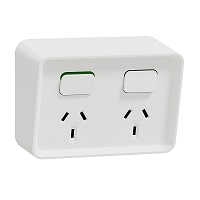
Iconic Double Switch Power Point horizontal mount, 250V, 10A | Extra White
Item Number: 3025-XW


Specifications
Design
| Range of product | Iconic |
|---|---|
| Range | Clipsal Iconic |
| Product or component type | switched socket |
| Surface finish | matt |
| Surface treatment | untreated |
Physical
| Device presentation | complete product |
|---|---|
| Socket number | 2 |
| Connections - terminals | screw terminals |
| Installation direction | horizontal |
| Device mounting | flush |
| Number of rocker | 2 |
| Rated current | 10 A |
| [ue] rated operational voltage | 230/240 V |
| Fixing mode | by screws |
| Clamping connection capacity |
|
| Wire stripping length | 16 mm |
| Net weight | 116 g |
| Ambient air temperature for operation | 0...45 °C |
| Height | 78 mm |
| Width | 120 mm |
| Depth | 27 mm |
| Mercury free | Yes |
| Rohs exemption information | Yes |
| Environmental disclosure | ENVPEP1607004EN |
| Eu rohs directive | Compliant By Exemption |
| Quantity per set | set of 10 |
Documents & downloads
Filter items
-
All
-
Environmental Disclosure
-
Declaration of Conformity (Sustainability)

Frequently Asked Questions
How do I swap my Wiser connected socket outlet from BLE to Zigbee?
Hide Show
If the Socket is currently paired with Wiser by SE, remove/delete the socket from the App. Go to the Bluetooth settings on your phone/device and forget the socket that you just removed from the App.
Download the Wiser Room App, if you don’t have it on your smart device, and open it. Within Wiser Room tap Edit at the top right and select ‘Add New Device’. Follow the instructions and pair your socket with Wiser Room. Once paired in Wiser Room, tap on the socket and then tap on the cog to enter the settings of the device. Tap on Advanced Settings, tap on Device Information and then proceed to update the Firmware of the socket.
Once the firmware update is completed and you can re-connect to the device once again check to make sure there are no more firmware updates. Once confirmed remove the socket from Wiser Room App by tapping Edit in the top right and then delete the device. Open the Bluetooth settings on your phone and once again remove the socket from here.
To then swap the socket from Bluetooth to Zigbee tap the touch switch LED panel 12 times. When the swap is completed you will see both the left and right LED on the panel blinking together indicating you are in Zigbee mode. Tap the touch switch panel to stop the blinking.
In Wiser by SE, go to the home you wish to add the socket to and tap the plus symbol in the top right corner. Go to the Add with Hub option and select the Iconic Socket and follow the instructions, tap the LED panel 3 times as per the animation and confirm that both LED’s on the panel are flashing.
Download the Wiser Room App, if you don’t have it on your smart device, and open it. Within Wiser Room tap Edit at the top right and select ‘Add New Device’. Follow the instructions and pair your socket with Wiser Room. Once paired in Wiser Room, tap on the socket and then tap on the cog to enter the settings of the device. Tap on Advanced Settings, tap on Device Information and then proceed to update the Firmware of the socket.
Once the firmware update is completed and you can re-connect to the device once again check to make sure there are no more firmware updates. Once confirmed remove the socket from Wiser Room App by tapping Edit in the top right and then delete the device. Open the Bluetooth settings on your phone and once again remove the socket from here.
To then swap the socket from Bluetooth to Zigbee tap the touch switch LED panel 12 times. When the swap is completed you will see both the left and right LED on the panel blinking together indicating you are in Zigbee mode. Tap the touch switch panel to stop the blinking.
In Wiser by SE, go to the home you wish to add the socket to and tap the plus symbol in the top right corner. Go to the Add with Hub option and select the Iconic Socket and follow the instructions, tap the LED panel 3 times as per the animation and confirm that both LED’s on the panel are flashing.
How do I convert Iconic Wiser™ Connected Socket from Zigbee to BLE
Hide ShowSee below video
What is the IP rating for the Iconic Outdoor sockets?
Hide Show
All Iconic Outdoor sockets have a rating of IP54.
Do the conduit caps come with the Iconic Outdoor?
Hide Show
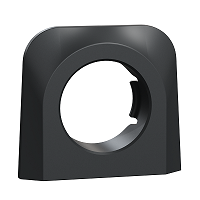
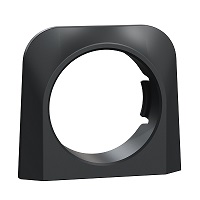
No, the conduit caps are supplied separately and come in two sizes 20mm and 25mm.
How do you remove the cover from Iconic Outdoor once its clipped on?
Hide Show
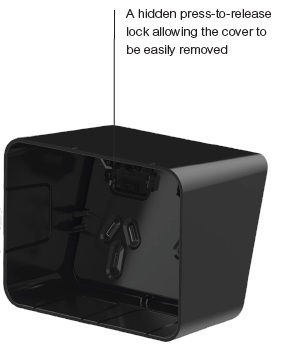
To remove the cover from Iconic Outdoor, push down on the top middle of the cover and pull away from wall.
Does the Iconic Outdoor socket maintain IP54 when a plug is inserted?
Hide Show
Although there is no requirement within Australian Standards to test the IP rating when a plug is inserted into a socket, we recommend using a sealed plug or socket such as 56 Series in wet environments.