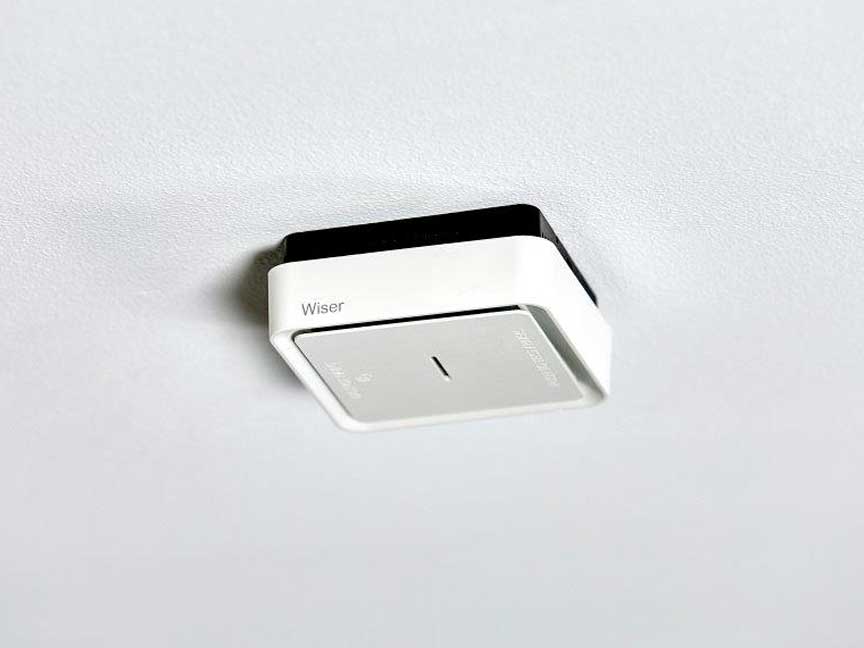
Smoke Alarms Photoelectric Smoke Alarm FireTek Wireless interconnect, Surface mount, 10-year lithium battery powered
Item Number: 755LPSMA4
Smoke alarm for residential applications using photoelectric technology. Clipsal smoke alarms detects hazardous smoke and fire and provides warning to occupants in a home. The device can wirelessly interconnect with other 755LPSMA4 units and 755RFB2 bases. FireTek range. Powered by a sealed-in lithium battery with a 10-year lifetime.
Datasheet

Close
Specifications
Design
| Range | Fire Tek |
|---|---|
| Product brand | Clipsal |
| Product or component type | smoke detector |
| Device application | early detection of smouldering fires and open fires |
Physical
| Supply | battery |
|---|---|
| [ie] rated operational current | 70 mA |
| Function available | local alarm |
| Control type | button (test/hush function) |
| Operating distance |
|
| Transmission frequency | 433420 kHz |
| Local signalling |
|
| Type of installation | indoor |
| Device mounting | surface |
| Mounting support |
|
| Fixing mode | by screws |
| Depth | 37.5 mm |
| Ip degree of protection | IP20 |
| Ambient air temperature for operation | 0...45 °C |
| Ambient air temperature for storage | -20...60 °C |
| Relative humidity | 5...95 % |
| Product certifications |
|
| Standards |
|
| Mercury free | Yes |
| Rohs exemption information | Yes |
| Environmental disclosure | ENVPEP1907002EN |
| Eu rohs directive | Compliant By Exemption |
Material
| Material | thermoplastic |
|---|
Documents & downloads
Filter items
-
All
-
Product Brochures
-
Installation Instruction
-
End of Life Manual
-
Environmental Disclosure
-
Certificates (MSDS)
-
Declaration of Conformity (Sustainability)
ZIP
PDL, Electric Home Design Digital Magazine
VERSION
5.2
DATE
25 Aug 2026
REVISION
5.2
DOWNLOAD (ZIP) 7.4 MB
ZIP
PDL, 755 series smoke alarm specifications flyer
VERSION
1.0
DATE
25 Jul 2024
REVISION
1.0
DOWNLOAD (ZIP) 770.4 KB
ZIP
Fire Tek and Wiser Smoke alarms - Photoelectric Smoke alarms
VERSION
1.0
DATE
25 Mar 2024
REVISION
1.0
DOWNLOAD (ZIP) 5 MB

Frequently Asked Questions
What causes the smoke alarm to continuously beep ?
Hide Show
The dust inside the smoke alarms can cause a continuous beep.
Please follow the regular maintenance check to avoid this.
Vacuum the smoke alarms using a soft brush attachment-
Keeping your smoke alarm free of dust particles, dirt, kitchen grease or cobwebs will help you reduce false alarms and ensure any smoke can easily reach the internal sensing chamber.
Clean and wipe down around unit-
Clean around the smoke alarm unit and remove any insects or other contamination which may have occurred. Spray bug repellent on a cloth and wipe the ceiling around the smoke alarm to act as a future bug deterrent. Clean every 3-6 months to mitigate insect ingress.
ALWAYS TEST THE SMOKE ALARM AFTER CLEANING.
Attached is the Clipsal smoke alarm troubleshooting guide for more info.
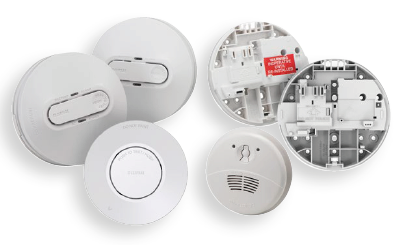
Please follow the regular maintenance check to avoid this.
Vacuum the smoke alarms using a soft brush attachment-
Keeping your smoke alarm free of dust particles, dirt, kitchen grease or cobwebs will help you reduce false alarms and ensure any smoke can easily reach the internal sensing chamber.
Clean and wipe down around unit-
Clean around the smoke alarm unit and remove any insects or other contamination which may have occurred. Spray bug repellent on a cloth and wipe the ceiling around the smoke alarm to act as a future bug deterrent. Clean every 3-6 months to mitigate insect ingress.
ALWAYS TEST THE SMOKE ALARM AFTER CLEANING.
Attached is the Clipsal smoke alarm troubleshooting guide for more info.
VIDEO - How to Test the Interconnection of a 755LPSMA4 Smoke Alarm?
Hide Show
This video demonstrates the techniques involved in testing the wireless interconnect on the 755LPSMA4 smoke alarm.
►Learn More: https://www.clipsal.com
►Learn More: https://www.clipsal.com
VIDEO - How to Interconnect a Smoke Alarm 755LPSMA4?
Hide Show
This video explains interconnecting smoke alarms together wirelessly. It includes the part number 755LPSMA4.
►Learn More: https://www.clipsal.com
►Learn More: https://www.clipsal.com
How to delete the paired coding on 755LPSMA4 Smoke Alarm?
Hide Show
Please note: It is not recommended to remove or delete the coding from the MASTER alarm.
Remove slave alarm from the bracket before performing the steps below.
Attached is the installation instructions of 755LPSMA4 for more info.
Remove slave alarm from the bracket before performing the steps below.
- Remove the unit from mounting bracket to power OFF the unit.
- Press and hold Test/Hush button and then install the unit back to mounting bracket to power ON the unit.
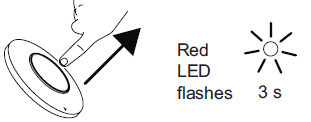
- Red LED will light on for 3 seconds. Only release the button after Red LED light is off.
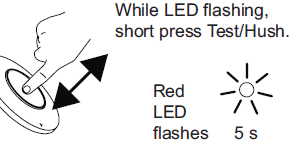
- Red LED will light on for another 3 seconds. During these 3 seconds, briefly press Test/Hush button to delete the coding.
- Red Led will flash for 5 seconds if deleting is successful.
Attached is the installation instructions of 755LPSMA4 for more info.
How do you Interconnect a 755RFB2 smoke alarm bases with a 755LPSMA4 smoke alarm?
Hide Show
See the below "How to video".
The part number for the products seen in this video is a 755RFB2 base and a 755LPSMA4 smoke alarm.
For further information please visit
Smoke alarm: https://www.clipsal.com/products/detail?CatNo=755LPSMA4&tab-document-1=1
Wireless base: https://www.clipsal.com/products/detail?CatNo=755RFB2&tab-document-1=1
The part number for the products seen in this video is a 755RFB2 base and a 755LPSMA4 smoke alarm.
For further information please visit
Smoke alarm: https://www.clipsal.com/products/detail?CatNo=755LPSMA4&tab-document-1=1
Wireless base: https://www.clipsal.com/products/detail?CatNo=755RFB2&tab-document-1=1
Can the Wiser smoke alarm interconnect with my existing alarms?
Hide Show
The Wiser Smoke alarm (CLP599WSAL) has 433MHz RF and Zigbee 3.0 tech included, meaning they are compatible with Clipsal Fire Tek® Wireless smoke alarms 755LPSMA4 and 755RFB2 bases to allow simple upgrade opportunities