

Standard Series Socket Outlet Double, Auto Switch, Horizontal, 10A, Single Pole | White Electric
Item Number: 20-WE
Datasheet

Specifications
Design
| Range of product | Standard Series |
|---|---|
| Product or component type | socket-outlet |
| Product brand | Clipsal |
Physical
| Quantity per set | set of 2 |
|---|---|
| Marking | without marking |
| Local signalling | without light indicator |
| Fixing mode | by screws |
| [in] rated current | 10 A |
| [ue] rated operational voltage | 250 V AC |
| Depth | 16 mm |
| Length | 115 mm |
| Fixing center | 84 mm |
| Number of poles | 1 |
| Width | 73 mm |
| Standards |
|
| Environmental disclosure | ENVPEP120506EN |
| China rohs regulation | Product out of China RoHS scope |
| Eu rohs directive | Compliant By Exemption |
Documents & downloads
-
All
-
Technical Data Catalogues
-
Declaration of Conformity (Sustainability)

Frequently Asked Questions
Do the conduit caps come with the Iconic Outdoor?
Hide ShowWiser2 apps Security Update notice
Hide Show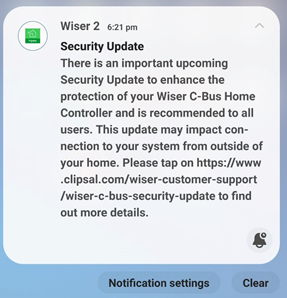
|
|
Dear SpaceLogic C-Bus Community, We want to notify you about a critical security update for the Wiser 2 app. This update will affect users as the app will no longer support the unsecured Remote Connection feature, which allows connection to the mobile app from outside the home. Users of the Wiser 2 app will receive a push notification about this update in early January 2024, and the new app with the security update will be available for download in February 2024. This update impacts Wiser 1, Wiser 1.5, Wiser MK II, and SpaceLogic C-Bus Home Controller users, with actions varying depending on the controller installed in the system. The push notification that will be sent to Wiser 2 app users in early January, will guide them to a non-indexable web page for details based on the controller they have in their installations. Please refer to the following link for more information: https://www.clipsal.com/wiser-customer-support/wiser-c-bus-security-update We kindly request that you disseminate this information to your customer support teams. Thank you, |
Will the Pro series outlets fit in the Tal Plus skirting duct?
Hide ShowThe power shrouds (PLPSK) are not large enough for the back of the outlet to fit in.
How to change the order of the Schedule in PICED so it sits in the correct order that you want on the wiser2 apps
Hide ShowWiser2 apps Widget/Schedule not in order.
To change the order of the widget display in wiser2 apps.
PICED> In widget manager
- Aligning them from low to high by clicking the number column
- Highlight the widget then drag and drop the widget in the order that you please
The order can also be change for scheduler
- Aligning the Schedules from low to high by clicking the number column
- Highlight the schedule widget then drag and drop the widget in the order that you please
How to Enable +/- Speeds Around Preset Speeds on ATV320 Drive
Hide ShowIt is possible to set preset speeds on the ATV320 drive and also allow for manual speed adjustments above and below those presets. Please refer to the steps below.
- Set desired preset speeds in [PRESET SPEEDS] menu as shown.
RDY -> CONF -> FULL -> LAC -> Epr (Expert)
RDY-> CONF -> FULL -> Fun [Application Function] -> PSS - [Preset Speeds]
- Set up desired values for speed around reference in [SPEED AROUND REFERENCE] menu.
RDY -> CONF -> FULL -> Fun [Application Function] -> SrE (menu shown below)
Example:
Setting Access level to Expert access.
Assigning Digital Inputs 2 and 3 to control preset speeds (enabling up to three preset speeds)
Preset Speeds 2, 3, and 4 configured to 14 Hz, 18 Hz, and 22 Hz respectively.
Setting Digital input 4 for increase in speed (+).
Setting Digital input 5 for decrease in speed (-).
A +/- speed variation limit of 13% has been applied, restricting any increase or decrease from the preset speed to a maximum of 13%.
Acceleration and deceleration time for changing speed set to 5s.
Wiser2/SLHC Remote Connection for PICED 1.14.2 onward
Hide ShowIn the new Firmware Wiser 2 will only be able to connect remotely using SSL/HTTPS (Port 443 or the External Port that is defined in PICED)
This means HTTP or Port 80 will now longer allow you to login remotely
Whenever you change the remote connection setting, it will force a reboot of the Wiser 2
Wiser 2 with WiFi – wiser2firmware_1_33_1.img, Wiser 2 without WiFi – SLHomeControllerFirmware_2_01_1.img