
Resi9 Mini Neutral Link 100A, 500V, 5 hole with cover front wiring Black, Box of 10
Item Number: L5
This MAX4 accessory is a screw mounted neutral link. it is a 1P, rated current is 100A, and rated operational voltage is 500VAC. The cable cross section capacity goes up to 16-16mm². The color of the neutral link is black.
Datasheet

Close
Specifications
Design
| Range | MAX9 |
|---|---|
| Product brand | Clipsal |
| Range of product | Blue Point |
| Product or component type | neutral link |
Physical
| [in] rated current | 100 A |
|---|---|
| [ue] rated operational voltage | 500 V |
| Connector type | screw terminals |
| Number of poles | 1 |
| Mercury free | Yes |
| Rohs exemption information | Yes |
| Environmental disclosure | ENVPEP2206007EN |
| Eu rohs directive | Compliant By Exemption |
Documents & downloads
Filter items
-
All
-
Technical Data Catalogues
-
Specification Guide
-
Declaration of Conformity (Sustainability)
Frequently Asked Questions
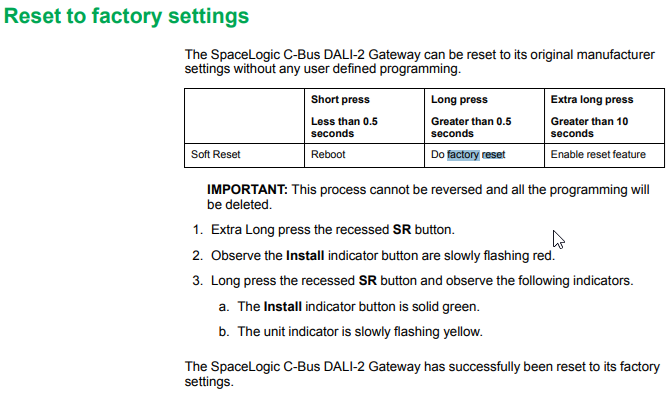
How to Factory Reset daligateway2 (5502CDGP230) to original manufacturer settings
Hide ShowTo factory reset the daligateway2. Simply press the SR button with pointy device i.e a paper clip for 10 Seconds. Release then a long press for more than 0.5 sec.

My Wiser battery device is showing the battery is almost flat, but it hasn’t been 5 years?
Hide Show
The battery devices state Up to 5 years and that this may vary based on the default settings, usage, frequency of firmware updates and the environment its placed in.
For example if the Temperature/Humidity sensor was placed where temperature fluctuation were happening frequently this would increase the number of reports it sends and therefore increase the battery usage when compared to one that is reporting less frequently.
For example if the Temperature/Humidity sensor was placed where temperature fluctuation were happening frequently this would increase the number of reports it sends and therefore increase the battery usage when compared to one that is reporting less frequently.
I want to put in two-way switching but can’t run the cables between the mechanisms. Can I achieve wireless two-way switching with Wiser Zigbee?
Hide Show
This can be done with our 2AX, 10AX or Micro Module Switch along with the Hub. At one end you will need an Active, Neutral and Load wiring. At the other end you will need Active and Neutral only. You can then create Automations to achieve the 2-way.
You need to create two automations for a 2-way:
You need to create two automations for a 2-way:
- when switch A and switch B are ON, turn switch A and switch B ON
- when switch A and switch B are OFF, turn switch A and switch B OFF
This can be expanded to 3-way, 4-way etc by simply adding the other switches into the respective ON and OFF automations.
Wiser motion sensor – What is detection delay and how do I program it?
Hide Show
Detection delay can be set to 15, 30, 45 and 60 seconds as a preset option or you can set a custom time value between 1 second and 59 minute 59 seconds.
Be aware that changing the detection delay value can change the battery life of the product.
To explain how this works we will use 5 minutes detection delay as an example. When motion is detected the sensor sends the signal ‘occupied’ to the hub. If no more motion is detected within the 5 minutes the sensor will send the signal ‘unoccupied’. If there was motion detected during the 5 minutes the 5 minutes will restart again. This will continue restarting until no motion is detected.
To configure the Wiser Motion sensor to control another Wiser product you will need to go into your Automations and create two Automations. One Automation as an ‘on’ and another as an ‘off’.
The ‘on’ Automation can be created by first selecting to add a new Automation. Once open name the Automation accordingly. Add a condition ‘when device status changes’, select the motion sensor, select motion state and occupied. Then add an action of what you want to occur when the motion sensor detects motion. As an example, if you wanted to turn on a device you would add task of ‘run the device’. This will then bring up the list of devices you have to choose from to operate and once you select a device you can then select to turn it on or off.
The ‘off’ Automation is the same as the ‘on’ Automation but select the motion sensor state of ‘unoccupied’ as the condition.


Be aware that changing the detection delay value can change the battery life of the product.
To explain how this works we will use 5 minutes detection delay as an example. When motion is detected the sensor sends the signal ‘occupied’ to the hub. If no more motion is detected within the 5 minutes the sensor will send the signal ‘unoccupied’. If there was motion detected during the 5 minutes the 5 minutes will restart again. This will continue restarting until no motion is detected.
To configure the Wiser Motion sensor to control another Wiser product you will need to go into your Automations and create two Automations. One Automation as an ‘on’ and another as an ‘off’.
The ‘on’ Automation can be created by first selecting to add a new Automation. Once open name the Automation accordingly. Add a condition ‘when device status changes’, select the motion sensor, select motion state and occupied. Then add an action of what you want to occur when the motion sensor detects motion. As an example, if you wanted to turn on a device you would add task of ‘run the device’. This will then bring up the list of devices you have to choose from to operate and once you select a device you can then select to turn it on or off.
The ‘off’ Automation is the same as the ‘on’ Automation but select the motion sensor state of ‘unoccupied’ as the condition.
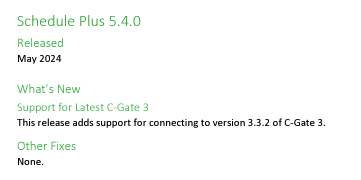
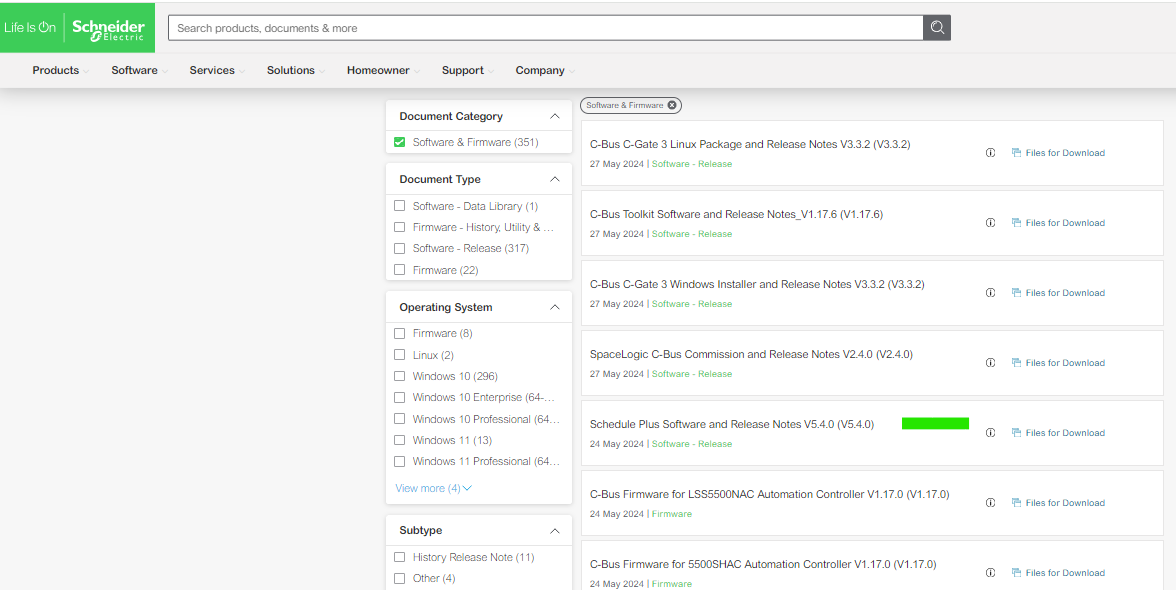
Which version of Schedule Plus is compatible with C-Gate 3?
Hide ShowSchedule plus V5.4.0 is compatible with C-Gate 3
Release note:
Download link:

Where to download the SpaceLogic C-Bus Commission V2.2.0?
Hide Show
Where to download the SpaceLogic C-Bus Commission V2.2.0?
Release Date: 02/04/2024
Version: V2.2.0
Reference: C-Bus-Commission_V2.2.0
C-Gate: 3.3.0 (build 1825)
Operating systems: Windows 11 Professional (64-bit), Windows 10 Professional (64-bit), Windows 10 Enterprise (64-bit), Windows 10.
What’s New
• Dimmer conversion will add default channel name
When converting older LE dimmers DIMDN4 or DIMDN8 (L5504D2A or L5508D1A) to the new digital dimmers DIMDD4 (5504D2D) and DIMDD8 (5508D1D), the software will now automatically insert a default channel name per channel.
• Network Summary for a C-Bus Network
The C-Bus Network node will show the summary of network information and status including the C-Bus Current supplied and consumed values plus the network impedance value. This data is only taking the project devices into consideration (not the live network devices).
• View the in-built C-Bus power supply status of C-Bus Digital Dimmers on the live network
An icon has been added to the Status column in the Network Devices section of the C-Bus Devices workspace indicating whether the in-built C-Bus Power Supply for the new C-Bus Digital Dimmer (DIMDD4 and DIMDD8) is enabled or disabled.
Fixes
• Project conversion issues. The software will now show correctly when a project has truly failed to convert. Issue with projects in “Waiting” resolved.
• Multiple confirmation dialogues when delete a device in project.
• When transferring to a C-Bus Automation Controller and C-Bus Application Controller, updating a Tag Map name will create an Object if one does not exist, this can result in additional objects created in controller that were not defined in the Object List. Note, this release of SpaceLogic C-Bus Commission software is only compatible with the C-Bus Automation Controller and C-Bus Application Controller firmware version 1.16.0 (when using the Controller Sync function).
• Warn Before Off Enable Group in live network Digital Dimmer is blank and not auto created during a network scan.
• Network burden property of Digital Dimmers did not update the C-Bus summary data (not included in network calculator).
Known Issues
• A slight delay may be seen when switching views back and forth between the Measurement and Error applications where a large amount of data (150 items or more) exists.
• Clicking on the Main Menu repeatedly will result in a decrease in software performance. C-BUS COMMISSION RELEASE NOTES 2
• Switching projects 10 or more times will result in a decrease in software performance.
• Measurement application values presented from the live network may not appear truncated and rounded to reasonable decimal places.
Link to download the SpaceLogic C-Bus Commission V2.2.0
https://www.se.com/nz/en/download/document/C-Bus-Commission_V2.2.0/
or
https://www.se.com/au/en/product-range/2216-spacelogic-cbus-home-automation-system/?parent-subcategory-id=88010&filter=business-5-residential-and-small-business#software-and-firmware
Release Date: 02/04/2024
Version: V2.2.0
Reference: C-Bus-Commission_V2.2.0
C-Gate: 3.3.0 (build 1825)
Operating systems: Windows 11 Professional (64-bit), Windows 10 Professional (64-bit), Windows 10 Enterprise (64-bit), Windows 10.
What’s New
• Dimmer conversion will add default channel name
When converting older LE dimmers DIMDN4 or DIMDN8 (L5504D2A or L5508D1A) to the new digital dimmers DIMDD4 (5504D2D) and DIMDD8 (5508D1D), the software will now automatically insert a default channel name per channel.
• Network Summary for a C-Bus Network
The C-Bus Network node will show the summary of network information and status including the C-Bus Current supplied and consumed values plus the network impedance value. This data is only taking the project devices into consideration (not the live network devices).
• View the in-built C-Bus power supply status of C-Bus Digital Dimmers on the live network
An icon has been added to the Status column in the Network Devices section of the C-Bus Devices workspace indicating whether the in-built C-Bus Power Supply for the new C-Bus Digital Dimmer (DIMDD4 and DIMDD8) is enabled or disabled.
Fixes
• Project conversion issues. The software will now show correctly when a project has truly failed to convert. Issue with projects in “Waiting” resolved.
• Multiple confirmation dialogues when delete a device in project.
• When transferring to a C-Bus Automation Controller and C-Bus Application Controller, updating a Tag Map name will create an Object if one does not exist, this can result in additional objects created in controller that were not defined in the Object List. Note, this release of SpaceLogic C-Bus Commission software is only compatible with the C-Bus Automation Controller and C-Bus Application Controller firmware version 1.16.0 (when using the Controller Sync function).
• Warn Before Off Enable Group in live network Digital Dimmer is blank and not auto created during a network scan.
• Network burden property of Digital Dimmers did not update the C-Bus summary data (not included in network calculator).
Known Issues
• A slight delay may be seen when switching views back and forth between the Measurement and Error applications where a large amount of data (150 items or more) exists.
• Clicking on the Main Menu repeatedly will result in a decrease in software performance. C-BUS COMMISSION RELEASE NOTES 2
• Switching projects 10 or more times will result in a decrease in software performance.
• Measurement application values presented from the live network may not appear truncated and rounded to reasonable decimal places.
Link to download the SpaceLogic C-Bus Commission V2.2.0
https://www.se.com/nz/en/download/document/C-Bus-Commission_V2.2.0/
or
https://www.se.com/au/en/product-range/2216-spacelogic-cbus-home-automation-system/?parent-subcategory-id=88010&filter=business-5-residential-and-small-business#software-and-firmware