
Standard Series Switch 1 Gang, 250V, 10A, 1 Way/2 Way | White Electric
Item Number: 30-WE
Datasheet

Specifications
Design
| Range of product | Standard Series |
|---|---|
| Product brand | Clipsal |
Physical
| Device presentation | basic element with full cover plate and grid |
|---|---|
| Number of poles | 1 |
| Device mounting | flush |
| Number of rocker | 1 |
| Local signalling | without |
| [ue] rated operational voltage | 250 V AC |
| Rated current | 10 A |
| Marking | without marking |
| Fixing mode | by screws |
| Actuator | rocker |
| Switch function | 1-pole |
| Mercury free | Yes |
| Rohs exemption information | Yes |
| Environmental disclosure | ENVPEP120506EN |
| Eu rohs directive | Compliant By Exemption |
Documents & downloads
-
All
-
Technical Data Catalogues
-
Certificates (MSDS)
-
Declaration of Conformity (Sustainability)
Frequently Asked Questions
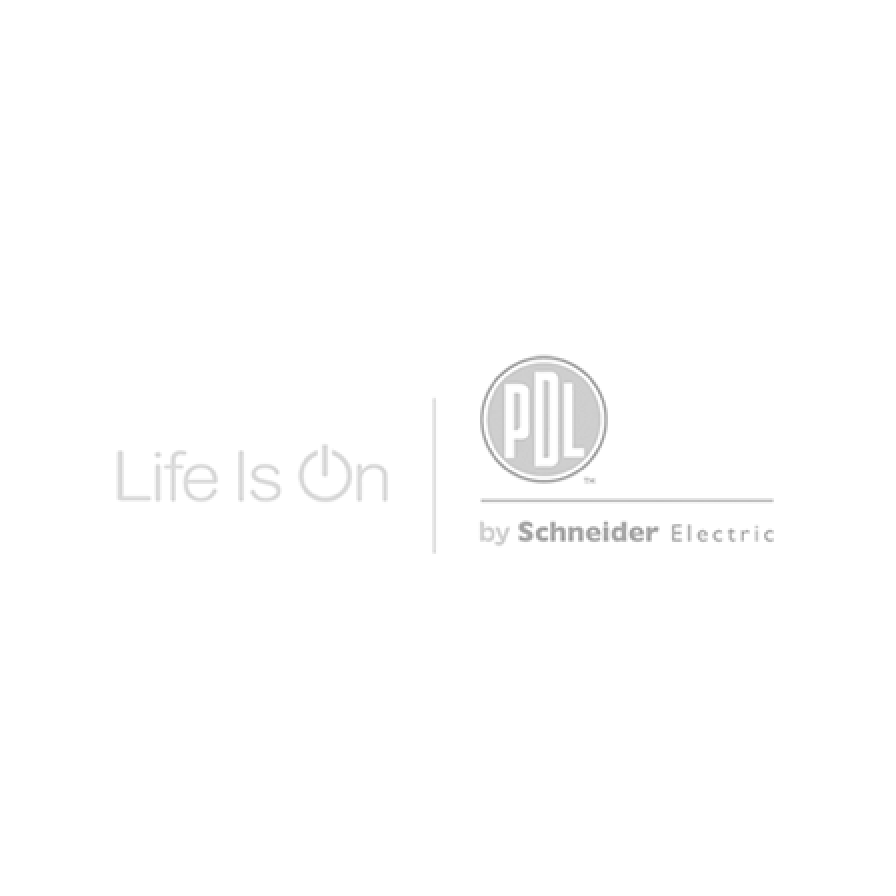
How to Factory Reset daligateway2 (5502CDGP230)?
Hide ShowTo factory reset the daligateway2. Simply press the SR button with pointy device i.e a paper clip
HOLD DOWN THE (SR) BUTTON FOR 10 SEC. LET GO THEN HOLD IT DOWN AGAIN FOR 2 SEC.

C-Bus Cable for underground
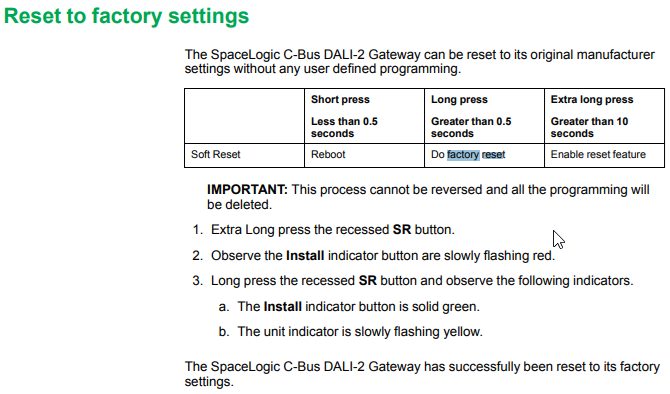
Hide ShowTypically for C-Bus underground cable use it needs to be a Cat5E UTP cable with the similar characteristics / impedance as the C-Bus 5005C305B cable.
If you use an underground CAT5E data cable from brands such as belden or garland etc
We would recommend you ask the supplier to provide confirmation they can provide a CAT5E UTP underground equivalent cable Gel filled.
Do not use shielded cabling.

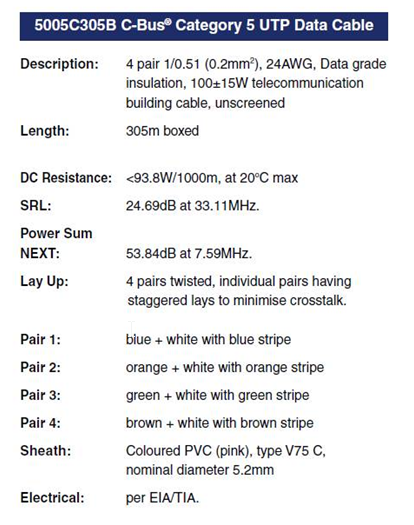
What dali device type does the C-BUS Dali2Gateway (5502CDGP230) support?
Hide ShowThe C-BUS Dali2Gateway F/W 1.8 can currently support DT0, DT1, DT6. It doe not yet support Tunable White and RGB/RGBW
How do I swap my Wiser connected socket outlet from BLE to Zigbee?
Hide ShowDownload the Wiser Room App, if you don’t have it on your smart device, and open it. Within Wiser Room tap Edit at the top right and select ‘Add New Device’. Follow the instructions and pair your socket with Wiser Room. Once paired in Wiser Room, tap on the socket and then tap on the cog to enter the settings of the device. Tap on Advanced Settings, tap on Device Information and then proceed to update the Firmware of the socket.
Once the firmware update is completed and you can re-connect to the device once again check to make sure there are no more firmware updates. Once confirmed remove the socket from Wiser Room App by tapping Edit in the top right and then delete the device. Open the Bluetooth settings on your phone and once again remove the socket from here.
To then swap the socket from Bluetooth to Zigbee tap the touch switch LED panel 12 times. When the swap is completed you will see both the left and right LED on the panel blinking together indicating you are in Zigbee mode. Tap the touch switch panel to stop the blinking.
In Wiser by SE, go to the home you wish to add the socket to and tap the plus symbol in the top right corner. Go to the Add with Hub option and select the Iconic Socket and follow the instructions, tap the LED panel 3 times as per the animation and confirm that both LED’s on the panel are flashing.
How do I convert Iconic Wiser™ Connected Socket from Zigbee to BLE
Hide ShowSee below video
Which pins or cables are associated with the 5500PS C-BUS power supply?
Hide ShowWhich pins or cables are associated with the 5500PS C-BUS power supply?
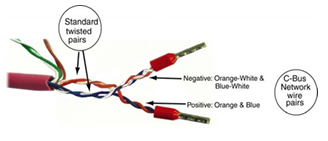
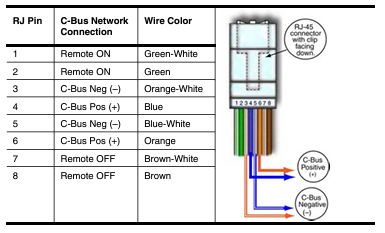
in 1-8 on the RJ45