Standard Series Switch 1 Gang, 250V, 10A, 1 Way/2 Way | White Electric
Item Number: 30-WE
Datasheet

Close
Specifications
Design
| Range of product | Standard Series |
|---|---|
| Product brand | Clipsal |
Physical
| Device presentation | basic element with full cover plate and grid |
|---|---|
| Number of poles | 1 |
| Device mounting | flush |
| Number of rocker | 1 |
| Local signalling | without |
| [ue] rated operational voltage | 250 V AC |
| Rated current | 10 A |
| Marking | without marking |
| Fixing mode | by screws |
| Actuator | rocker |
| Switch function | 1-pole |
| Mercury free | Yes |
| Rohs exemption information | Yes |
| Environmental disclosure | ENVPEP120506EN |
| Reach regulation | Reference contains Substances of Very High Concern above the threshold |
| China rohs regulation | Product out of China RoHS scope |
| Eu rohs directive | Compliant By Exemption |
Documents & downloads
Filter items
-
All
-
Technical Data Catalogues
-
Certificates (MSDS)
-
Declaration of Conformity (Sustainability)
Frequently Asked Questions
Which pins or cables are associated with the 5500PS C-BUS power supply?
Hide ShowWhich pins or cables are associated with the 5500PS C-BUS power supply?
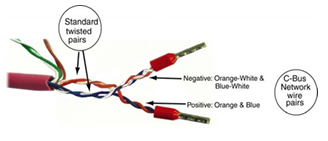
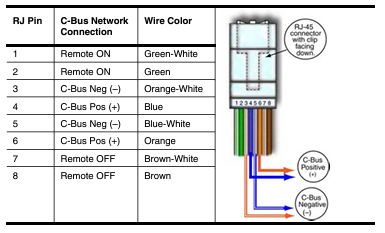
in 1-8 on the RJ45
What different scans can be performed on the DALI Line in C-Bus Commission?
Hide ShowAs of C-Bus Commission v2.15.0, the available scans for a DALI are:
1. DALI Scan
2. DALI Device Type Scan
3. Read DALI Gateway
4. Discover Faults
Note: A Scan can also be done by pressing the INSTALL button of each line on the front of the unit
Where to download the SpaceLogic C-Bus Commission V2.2.0?
Hide Show
Where to download the SpaceLogic C-Bus Commission V2.2.0?
Release Date: 02/04/2024
Version: V2.2.0
Reference: C-Bus-Commission_V2.2.0
C-Gate: 3.3.0 (build 1825)
Operating systems: Windows 11 Professional (64-bit), Windows 10 Professional (64-bit), Windows 10 Enterprise (64-bit), Windows 10.
What’s New
• Dimmer conversion will add default channel name
When converting older LE dimmers DIMDN4 or DIMDN8 (L5504D2A or L5508D1A) to the new digital dimmers DIMDD4 (5504D2D) and DIMDD8 (5508D1D), the software will now automatically insert a default channel name per channel.
• Network Summary for a C-Bus Network
The C-Bus Network node will show the summary of network information and status including the C-Bus Current supplied and consumed values plus the network impedance value. This data is only taking the project devices into consideration (not the live network devices).
• View the in-built C-Bus power supply status of C-Bus Digital Dimmers on the live network
An icon has been added to the Status column in the Network Devices section of the C-Bus Devices workspace indicating whether the in-built C-Bus Power Supply for the new C-Bus Digital Dimmer (DIMDD4 and DIMDD8) is enabled or disabled.
Fixes
• Project conversion issues. The software will now show correctly when a project has truly failed to convert. Issue with projects in “Waiting” resolved.
• Multiple confirmation dialogues when delete a device in project.
• When transferring to a C-Bus Automation Controller and C-Bus Application Controller, updating a Tag Map name will create an Object if one does not exist, this can result in additional objects created in controller that were not defined in the Object List. Note, this release of SpaceLogic C-Bus Commission software is only compatible with the C-Bus Automation Controller and C-Bus Application Controller firmware version 1.16.0 (when using the Controller Sync function).
• Warn Before Off Enable Group in live network Digital Dimmer is blank and not auto created during a network scan.
• Network burden property of Digital Dimmers did not update the C-Bus summary data (not included in network calculator).
Known Issues
• A slight delay may be seen when switching views back and forth between the Measurement and Error applications where a large amount of data (150 items or more) exists.
• Clicking on the Main Menu repeatedly will result in a decrease in software performance. C-BUS COMMISSION RELEASE NOTES 2
• Switching projects 10 or more times will result in a decrease in software performance.
• Measurement application values presented from the live network may not appear truncated and rounded to reasonable decimal places.
Link to download the SpaceLogic C-Bus Commission V2.2.0
https://www.se.com/nz/en/download/document/C-Bus-Commission_V2.2.0/
or
https://www.se.com/au/en/product-range/2216-spacelogic-cbus-home-automation-system/?parent-subcategory-id=88010&filter=business-5-residential-and-small-business#software-and-firmware
Release Date: 02/04/2024
Version: V2.2.0
Reference: C-Bus-Commission_V2.2.0
C-Gate: 3.3.0 (build 1825)
Operating systems: Windows 11 Professional (64-bit), Windows 10 Professional (64-bit), Windows 10 Enterprise (64-bit), Windows 10.
What’s New
• Dimmer conversion will add default channel name
When converting older LE dimmers DIMDN4 or DIMDN8 (L5504D2A or L5508D1A) to the new digital dimmers DIMDD4 (5504D2D) and DIMDD8 (5508D1D), the software will now automatically insert a default channel name per channel.
• Network Summary for a C-Bus Network
The C-Bus Network node will show the summary of network information and status including the C-Bus Current supplied and consumed values plus the network impedance value. This data is only taking the project devices into consideration (not the live network devices).
• View the in-built C-Bus power supply status of C-Bus Digital Dimmers on the live network
An icon has been added to the Status column in the Network Devices section of the C-Bus Devices workspace indicating whether the in-built C-Bus Power Supply for the new C-Bus Digital Dimmer (DIMDD4 and DIMDD8) is enabled or disabled.
Fixes
• Project conversion issues. The software will now show correctly when a project has truly failed to convert. Issue with projects in “Waiting” resolved.
• Multiple confirmation dialogues when delete a device in project.
• When transferring to a C-Bus Automation Controller and C-Bus Application Controller, updating a Tag Map name will create an Object if one does not exist, this can result in additional objects created in controller that were not defined in the Object List. Note, this release of SpaceLogic C-Bus Commission software is only compatible with the C-Bus Automation Controller and C-Bus Application Controller firmware version 1.16.0 (when using the Controller Sync function).
• Warn Before Off Enable Group in live network Digital Dimmer is blank and not auto created during a network scan.
• Network burden property of Digital Dimmers did not update the C-Bus summary data (not included in network calculator).
Known Issues
• A slight delay may be seen when switching views back and forth between the Measurement and Error applications where a large amount of data (150 items or more) exists.
• Clicking on the Main Menu repeatedly will result in a decrease in software performance. C-BUS COMMISSION RELEASE NOTES 2
• Switching projects 10 or more times will result in a decrease in software performance.
• Measurement application values presented from the live network may not appear truncated and rounded to reasonable decimal places.
Link to download the SpaceLogic C-Bus Commission V2.2.0
https://www.se.com/nz/en/download/document/C-Bus-Commission_V2.2.0/
or
https://www.se.com/au/en/product-range/2216-spacelogic-cbus-home-automation-system/?parent-subcategory-id=88010&filter=business-5-residential-and-small-business#software-and-firmware
Can the new Dali gateway 5502DCGP230 firmware be updated?
Hide ShowYes installer can update the firmware of the device in the field
- without disconnecting any connections
- without removing the unit from the switchboard
A USB device port is provided on the front cover of the device as a power source.
Using Space logic C-Bus Commission software >
What is the IP rating for the Iconic Outdoor sockets?
Hide Show
All Iconic Outdoor sockets have a rating of IP54.
What other switch types are compatible to be installed in the Iconic Outdoor switch?
Hide Show
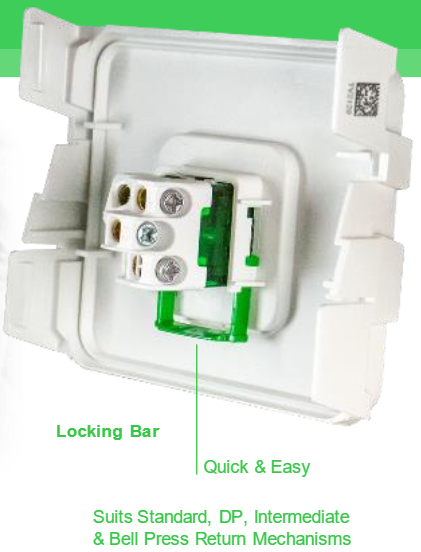
Iconic Outdoor switches utilise the Iconic locking bar and suits Double Pole, Intermediate and Bell Press Return rocker mechanisms.